

目的
- ブログ投稿数をチーム別に表示したい
- 直近3ヶ月分の投稿数を表示したい
- 新しいユーザが作成されたら分かるようにしたい
- 手軽に実装したい
やってみた事
ダッシュボードにチーム別の投稿数が表示されるWordpressプラグインを作成しました。
動作スクリーンショット

直近3ヶ月の各チーム/ユーザの投稿数が分かるようになっております。
(投稿済みの記事数がカウントされます)
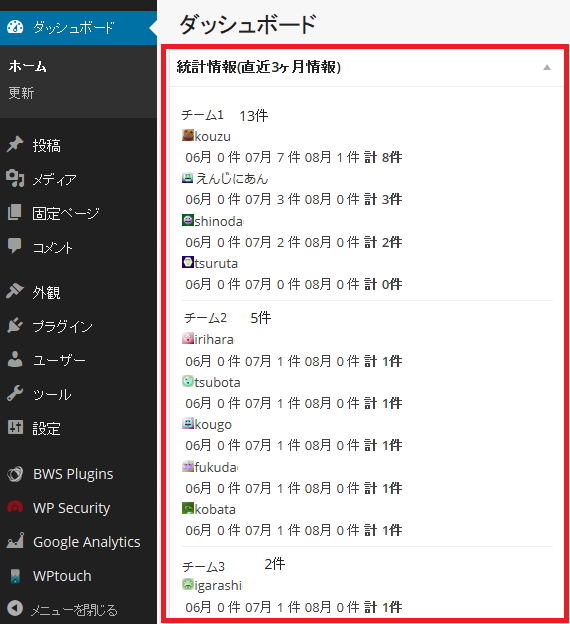
新しいユーザは、チーム分け未実施ユーザとして表示されます。
(IDを確認し、プログラム先頭のチーム配列へ追加する必要あり)

初めてのWordPressプラグイン作成でしたが、下記を参考に作成しました。
ありがとうございました。
http://netaone.com/wp/dashboard-notepad/
http://developer.wordpress.org/reference/
ソースコード
下記ソースコードを記載のディレクトリ構成にて配置後、プラグインメニューから有効化して下さい。
wp-content/plugins/dashboard-postinfo/dashboard-postinfo.php
動作確認Wordpressバージョン : 3.9.2
dashboard-postinfo.php
<?php
/*
Plugin Name: Dashboard PostInfo
Plugin URI: http://www.skyarch.net/
Description: Summary Statistics for TeamBlogging
Author: Takashi
Version: 1.00
Author URI: http://kouzu.info/
Text Domain: dashboard-postinfo
*/
/*
Dashboard Postinfo Copyright (C) 2014 Skyarchnetworks
Based on:
This program is free software; you can redistribute it and/or modify
it under the terms of the GNU General Public License as published by
the Free Software Foundation in the Version 2.
This program is distributed in the hope that it will be useful,
but WITHOUT ANY WARRANTY; without even the implied warranty of
MERCHANTABILITY or FITNESS FOR A PARTICULAR PURPOSE. See the
GNU General Public License for more details.
*/
function dashboard_postinfo_widget() {
global $wpdb;
// 無視するユーザID (カンマ区切りで記載)
$user_ignore = '4,7';
// ユーザグループ配列 グループ名 => ユーザID (カンマ区切りで記載)
$user_group = array(
'チーム1' => '1,2,3',
'チーム2' => '5,6,8',
'チーム3' => '9,10,11',
);
// 個別に投稿数を取得する月
$post_date_conditions = array(
date('Y-m', strtotime(date('Y-m-1').' -2 month')),
date('Y-m', strtotime(date('Y-m-1').' -1 month')),
date('Y-m'),
);
// 統計情報集計 投稿数を個人毎/グループ毎に集計
foreach ($user_group as $group_name => $group_member) {
$group_cnt[$group_name] = 0;
foreach (explode(',', $group_member) as $member_id) {
$member_cnt[$member_id] = 0;
foreach ($post_date_conditions as $post_date) {
$posts_cnt = $wpdb->get_var("SELECT COUNT(*) FROM $wpdb->posts WHERE
post_author = '${member_id}' AND
post_status = 'publish' AND
post_type = 'post' AND
post_date LIKE '${post_date}%'");
$group_cnt[$group_name] += $posts_cnt;
$member_cnt[$member_id] += $posts_cnt;
$member_info[$group_name][$member_id][$post_date] = $posts_cnt;
}
}
}
// 順番に表示
arsort($group_cnt);
foreach($group_cnt as $group_name => $cnt) {
echo "<div class='activity-block'><h4>${group_name} ${cnt}件</h4>";
arsort($member_info[$group_name]);
foreach($member_info[$group_name] as $member_id => $post_cnt_month) {
$usr = get_user_by('id', $member_id);
$user_define[$member_id] = $usr;
print get_avatar($member_id, 12) . $usr->user_nicename . "<br>";
print "<table>";
foreach ($post_cnt_month as $month => $cnt) {
print "<td>" . substr($month, -2) . "月</td>";
print "<td>${cnt} 件</td>";
}
print "<th>計 ${member_cnt[$member_id]}件</th></table>";
}
echo "</div>";
}
// 未所属ID表示
$users = get_users(array('orderby' => ID, 'order' => ASC));
foreach($users as $user) {
$user_all[$user->id] = $user;
}
foreach(explode(',', $user_ignore) as $ignore_id) {
unset($user_all[$ignore_id]);
}
// 全ユーザと定義ユーザの差分から無視ユーザを除く
$user_diff = array_diff_key($user_all, $user_define);
if (count($user_diff) > 0) {
echo '<div class="activity-block"><h4>未所属ID(チーム割り当てを実施して下さい)</h4>';
foreach($user_diff as $user) {
print get_avatar($user->id, 12) . ' ID:' . $user->ID . ' ' . $user->user_email . '<br>';
}
echo '</div>';
}
}
function dashboard_postinfo_css() {
?>
<style type="text/css">
</style>
<?php
}
function dashboard_postinfo_widget_setup() {
wp_add_dashboard_widget('dashboard_postinfo_widget_id',
'統計情報(直近3ヶ月情報)',
'dashboard_postinfo_widget');
}
// add styles to Dashboard only
add_action('admin_head-index.php', 'dashboard_postinfo_css');
add_action('wp_dashboard_setup', 'dashboard_postinfo_widget_setup');
?>
投稿者プロフィール

-
Japan AWS Ambassadors 2023, 2024
開発会社での ASP型WEBサービス企画 / 開発 / サーバ運用 を経て
2010年よりスカイアーチネットワークスに在籍しております
機械化/効率化/システム構築を軸に人に喜んで頂ける物作りが大好きです。